Ask any wedding photographer about album finalisation and they'll tell you the same thing - the editing was the easy part.
You've delivered the gallery. Five hundred, eight hundred, maybe a thousand edited photos sitting in a clean link. The couple has access. And then the message arrives: "Anna, album ku photos select panna sollunga." And what follows is the part of wedding photography that nobody talks about publicly but every studio dreads.
The couple starts sending screenshots of photos from your gallery on WhatsApp. Then voice notes. Then the bride's mother calls with her own list. Someone mentions "the one where the bride is laughing near the mandap" and you're scrolling through hundreds of frames trying to figure out which exact one they mean. Two weeks later, you still don't have a confirmed list and the album vendor is waiting.
This is the album selection problem. And it's completely solvable - just not with WhatsApp.
Why is WhatsApp bad for album photo selection? Because chats carry compressed screenshots and photo numbers instead of exact file references, picks arrive from several family members in separate threads, nothing enforces the photo limit in the client's package, and the final list gets buried in the conversation. A private selection gallery replaces all of that with one submitted list.
Album selection is the step where the client chooses which delivered photos go into the album, usually up to a number fixed by their package. Proofing is the broader process of sharing photos with a client to review and approve before final output. In a wedding workflow, album selection is a proofing step: the client reviews the gallery and approves the photos that go into the album.
Why WhatsApp Album Selection Doesn't Work
No Stable Reference Point
When a client says "send me photo number 47," that number means something on your export drive. It means nothing to them. And when they screenshot a photo from your gallery and send it back, there's no filename, no reference ID - just a compressed image you now have to reverse-identify in your folder.
This back-and-forth creates errors. The wrong photo gets included. The client says they selected the outdoor portrait but you've included the indoor one from the same position. Every mismatch adds another round of re-confirmation.
Multiple Decision-Makers Make It Worse
Indian weddings involve the entire family in every decision - and album selection is no exception. The bride wants certain photos. The mother-in-law has opinions. The groom's family has requests. You end up receiving lists from four different people via four different WhatsApp chats, with overlapping and sometimes conflicting selections.
Whose list is final? Who has authority? You're not a mediator - you're a photographer trying to send 50 files to a vendor. But without a structured system, you end up playing that role anyway.
Confirmation Messages Disappear
You ask the couple: "Is this the final list?" They say yes. Three weeks later, when the album arrives, someone says a photo they wanted isn't there. You check your WhatsApp history - the conversation is buried under hundreds of messages and the confirmation text is ambiguous. Was that an approval or a suggestion?
Without a written, timestamped record of exactly which photos were selected and confirmed, you have no protection when a client disputes the selection.
What Online Photo Selection Actually Looks Like
A proper online selection portal replaces all of this. The concept is simple: instead of the client telling you which photos they want through messages, they log into their private gallery and mark the photos directly - with a single click or tap on each image.
Here's how it works in practice with MyPhotoStudio:
Step 1 - You Set a Selection Quota
You set how many photos the client can select in the package attached to their booking - say, 75 for a standard album package. The system enforces this limit across every submission. Clients can't accidentally select 150 and then fight you over which ones to drop. The boundary is set upfront, in the agreement, and enforced automatically in the portal.
Step 2 - The Client Marks Photos Directly
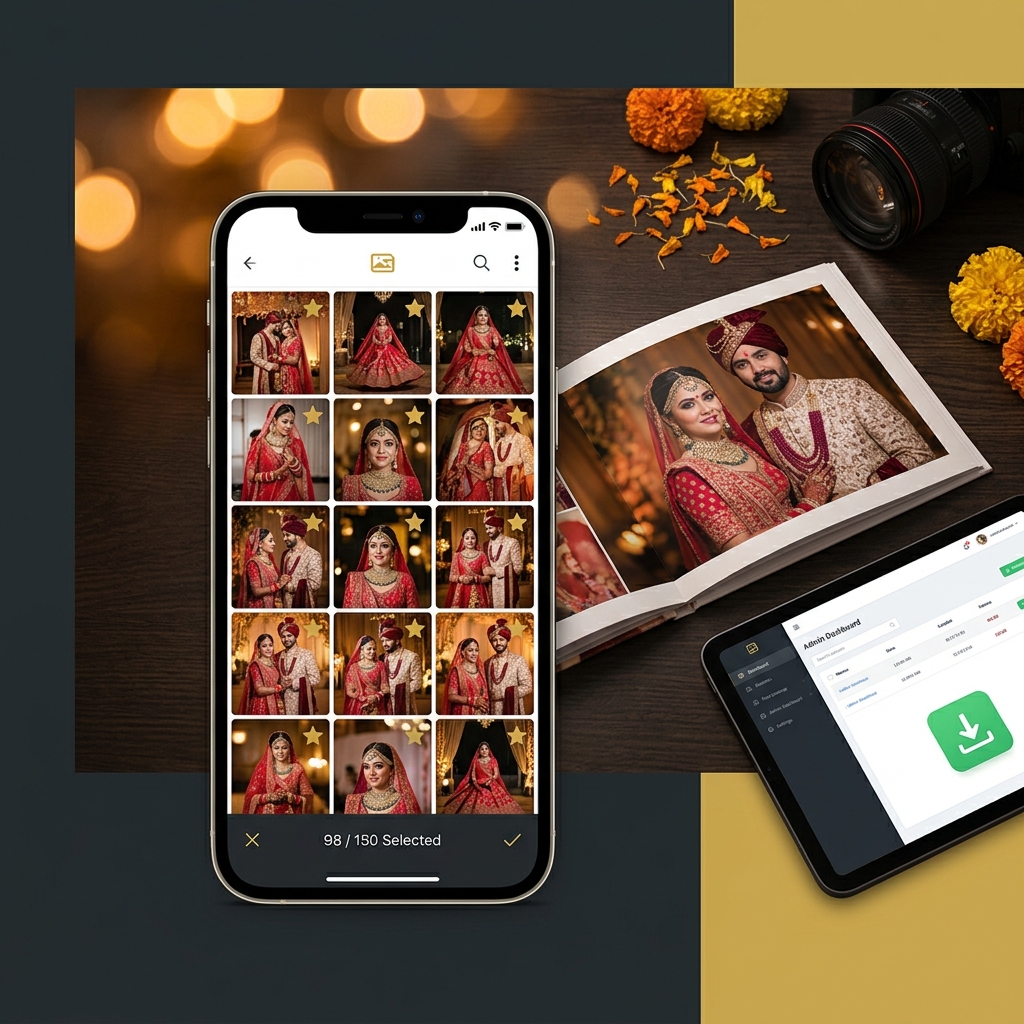
The couple opens their private client gallery link on their phone - no app to install. They tap each photo they want included, and the gallery shows how many photos are selected next to the package limit. They can change their picks freely and preview the selection before they submit.
The bride can go through the gallery one evening and the groom can review it the next morning. Family members can look at the gallery together and suggest favourites, while the couple submits the final picks from the same link. One source of truth, not five WhatsApp threads.
Step 3 - You Receive a Clean, Numbered List
Each submission is saved as a numbered selection with its photo count and submission date and time. The client sees it in their selection history, and you see the same history in your studio dashboard. Photos already submitted are marked, so the same photo is not submitted twice. No ambiguity. No cross-referencing.
You download each selection's files from the dashboard and work with your album vendor from that list. The entire coordination is replaced by one clean action on both sides.
The Real Workflow Change for Your Studio
Before: Selection With No Clear End
The first message asking for selections goes out. The client takes time to start. The initial list has 40 photos when you need 75 - so you go back for more. More messages. More calls. Someone from the family weighs in. Final confirmation comes, but then there's one revision request. Every round is another wait.
After: One Link, One Clear List
With an online portal, you send one WhatsApp message: "Your gallery is ready. Please select your 75 album photos from the link." The couple browses photos they love, taps their favourites, and submits. The limit, the count, and the record are handled by the system instead of the chat.
It's also the first time many couples see all their photos in one clean gallery, which makes selection part of the experience of your service rather than a source of friction.
Why This Matters for Client Relationships Too
Photographers sometimes frame album selection as a logistical problem. It is - but it's also a client experience problem. The couple is reliving their wedding through your photos. That experience should be smooth, enjoyable, and personal.
When the selection process is chaotic - when the bride is sending screenshots at midnight and waiting for your confirmation, when messages get missed and rounds of re-confirmation pile up - the final album feels like it was hard work to produce. The client remembers the friction.
When the process is clean - when they browse a beautiful gallery at their own pace, mark their favourites, and receive confirmation that the album is being prepared - the experience is warm. They feel involved and in control. The album lands better as a result.
This is the kind of detail that generates referrals. Not just "the photos were beautiful" but "the whole experience was seamless."
What to Look For in a Photo Selection Tool
If you're evaluating platforms, here are the specific things to check before committing:
- Selection quota control - you should be able to set exactly how many photos the client can select, matching your package terms. If there's no limit-setting, clients will over-select and create renegotiation.
- Available in all plans - some platforms restrict the client selection feature to their highest-tier annual plan. If you're on a starter or mid-range plan, you won't have access. Always check which plan includes selection before signing up.
- Works on mobile without an app - the couple will do their selection on their phones. If the selection portal requires an app download or a browser that most people don't have, adoption drops.
- Saved record of each submission - you need a dated record of what the client submitted and when, not just a list in a chat. This protects you if a dispute comes up later.
- Integrated with your gallery - the selection should happen inside the same gallery where you delivered the photos. If clients have to move between two separate platforms, the workflow breaks down.
- Photographer dashboard view - you should be able to see every submitted selection, how many photos it contains, and download the files without asking the client to resend anything.
A Note on Pricing
This is worth saying directly because it comes up often when photographers evaluate tools.
Client album selection is not a luxury feature. It is a standard part of the wedding photography workflow. Any platform that locks it behind a top-tier annual plan is treating a core studio requirement as a premium upsell.
MyPhotoStudio includes client photo selection software in every plan from ₹1,000 per event. It was built into the Starter plan from day one - because restricting it made no sense for studios who needed it most. You can check the full plan comparison here.
How Album Selection Fits Into Your Full Studio Workflow
Selection doesn't happen in isolation. It's one step in a chain that starts with booking and ends with album delivery. The steps that connect to it:
Before selection: Gallery delivered via QR code or WhatsApp link. Guests find their individual photos using AI face recognition - read how that works here. Print orders come in from guests. The couple browses the full gallery at their own pace.
During selection: The couple marks their album photos directly in the gallery, within the package limit, and submits. Each submission appears in your dashboard's selection history.
After selection: You download the selected files and send them to your album vendor. When the client pays the balance, the payment confirmation goes out automatically, with the invoice attached to the confirmation email. Read about how the auto-invoice workflow handles this.
The selection portal is the piece that connects gallery delivery to album production cleanly. Without it, that connection is a mess of screenshots and messages. With it, the handoff is clean and documented.
Getting Started
If you're currently managing album selections over WhatsApp, the switch to an online portal is not a major change. The couple still receives a gallery link - the difference is that inside that gallery, they can now mark their selections directly. One small addition to the workflow, but the impact on your time and communication load is significant.
The best way to understand how it actually works in practice is to try it on one event. Set up a gallery, share it with a couple, and watch how they use the selection feature.
Try it on your next wedding
MyPhotoStudio includes client photo selection in every plan from ₹1,000 per event. No separate subscription, no premium tier required.
WhatsApp Us to Get StartedTransform Your Photography Studio Today
Start automatically delivering thousands of event photos directly to your clients using MyPhotoStudio's AI Face Recognition - from ₹1,000 per event.
Start Free TrialExplore our AI photo sharing platform, learn about our photography CRM software, or view pricing plans.