The reception got over at 11:30pm. By midnight, the groom's uncle had already sent three WhatsApp messages asking for photos.
By the next morning, the photographer had 22 unread messages. Some from the bride's side. Some from the groom's side. Two from people he didn't even have saved. Everyone wanted photos. Not all the photos - their photos. The ones with them in it.
If you've shot a Tamil Nadu wedding, you already know this story. The editing takes a week. The delivery takes five minutes. And then the next two weeks are spent answering the same message from 40 different people: "Anna, en photos enga irukku?"
The problem isn't the photos. It's that 500 guests each want their specific set - and right now, there's no way to give it to them without you sitting in the middle doing it manually.
AI face search is the fix. Here's exactly how it works and how to set it up for your next wedding.
The Real Problem With Delivering Wedding Photos to Every Guest
The Photographer Becomes the Search Engine
Think about what actually happens after a wedding gallery goes live. You share one link. 500 guests open it. Each one is looking for the same thing - photos with themselves in it.
Without AI search, they have to scroll through the entire gallery manually. A 600-photo wedding gallery means scrolling through 600 thumbnails hoping to spot their face. Most guests give up after 2 minutes. Then they message you instead.
You're not a photographer anymore - you're a photo finding service operating over WhatsApp, for free, for two weeks after every event.
Sending Individual Photos Doesn't Scale
Some photographers try to sort photos by family or group before sending. So the bride's family gets Album A, the groom's friends get Album B, the maama's group gets Album C. This takes 2-3 hours of manual sorting per event. And you still get messages saying "anna, I was with both groups, I'm not in either album."
There's no manual solution that works cleanly for a 400-1,000 guest Tamil Nadu wedding. The guest count is just too high.
How AI Face Search Actually Works - In Simple Terms
You don't need to understand the technology in depth to use it. But here's what's happening when a guest finds their photos in under a minute:
Step 1 - Guest Opens the Gallery on Their Phone
No app download. No login. They tap the gallery link or scan the QR code at the venue. The gallery opens in their mobile browser - Chrome, Safari, whatever they already have. That's it.
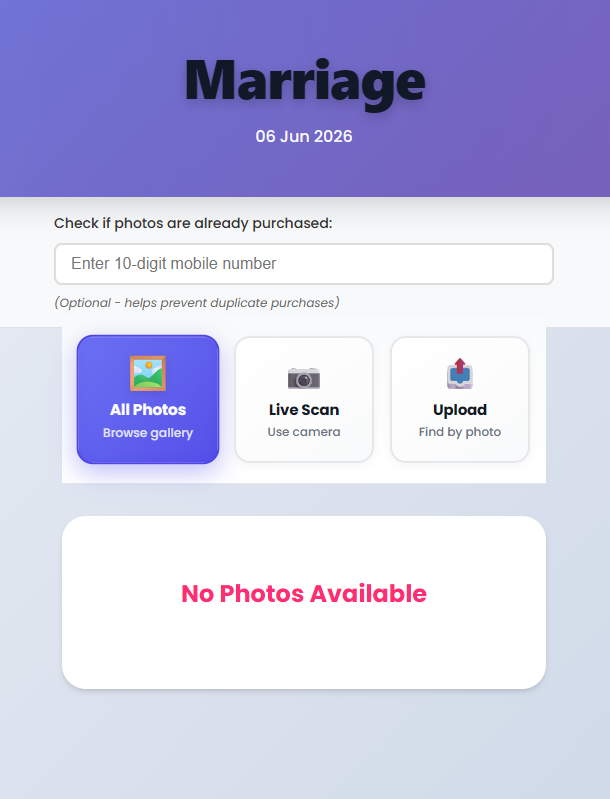
Step 2 - They Tap "Live Scan(Use camera)" and Take a Selfie or "Upload (Find by photo)" and attach your or relatives photo
There's a button in the gallery - "Find My Photos" or something similar depending on how your platform labels it. The guest taps it, their camera opens, they take a quick selfie. Or they upload a photo from their gallery if they prefer. Either works.
Step 3 - AI Scans Every Photo in the Event
This is where the technology does its job. The AI takes that selfie and compares the face against every single photo in your event gallery. A wedding with 800 photos - it checks all 800. The matching uses facial landmark analysis to identify the same person across different angles, lighting conditions, and distances.
This runs on AWS Rekognition - the same enterprise-grade face recognition that powers identity verification for large institutions. MyPhotoStudio uses it as the primary engine, with a Python-based AI system as backup so there's no downtime.
Step 4 - Results in Seconds
Within a few seconds, the guest sees only the photos they appear in. Not the full gallery - just their photos. If they were at the wedding in three different sessions - muhurtham in the morning, family photos in the afternoon, reception dinner at night - all three sets show up together in their results.
They can add photos to their selection right there. No scrolling. No calling you.
Step 5 - Check if photos are already downloaded or purchased
Enter your 10-digit mobile number to quickly identify photos that have already been purchased or downloaded. Previously purchased images will be marked with a ? tick icon, helping you avoid duplicate purchases and making photo selection faster and easier.
Setting This Up - The Photographer's Side
The guest experience looks effortless because the setup on your end is straightforward. Here's what you do in MyPhotoStudio:
When Creating the Event
When you create a new event in your studio dashboard, there's a face recognition setting. You turn it on. You pick the confidence threshold - how strict or loose the matching should be. For most Tamil Nadu weddings, the balanced setting works best: strict enough to avoid false matches, loose enough to handle group shots where faces are smaller.
For school and college events where you need to find a child in a crowd of 300 kids, you'd go slightly looser. For a corporate event where precision matters more, you'd tighten it. The platform gives you control.
When Uploading Photos
You upload your edited photos to the event. The system processes face embeddings in the background - meaning it's mapping and indexing every face in every photo so the search can happen fast when a guest uses it. You don't have to do anything for this. It runs automatically after upload.
The AI photo delivery feature handles events of any size. 300 photos or 3,000 - the indexing runs without you managing it.
How Guests Access It
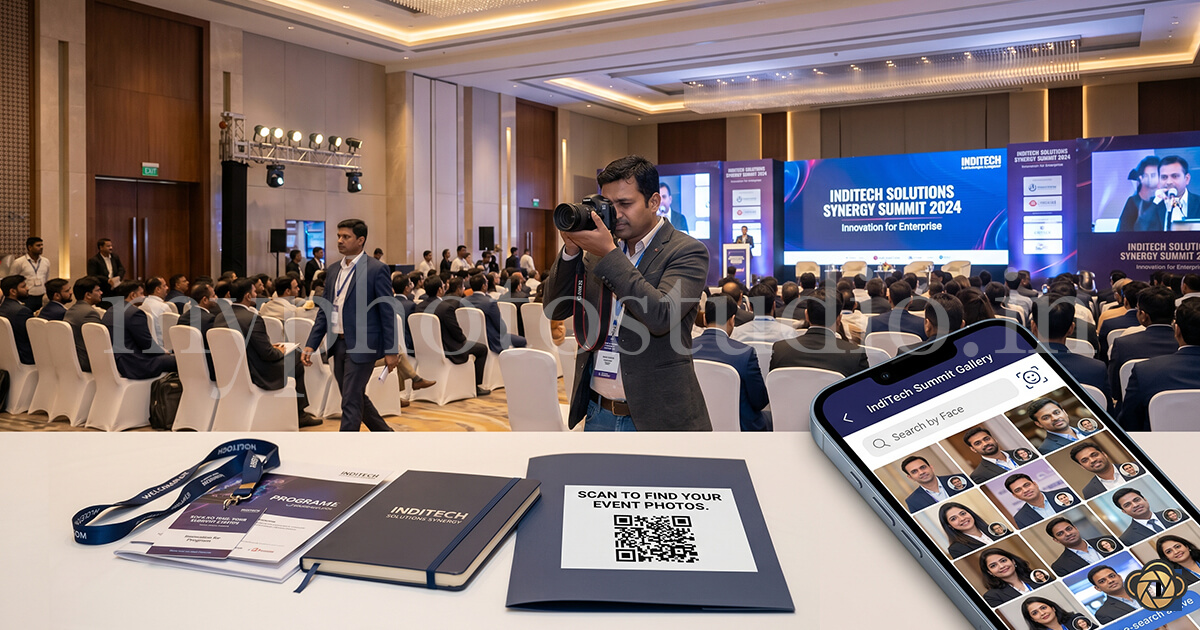
Every event in MyPhotoStudio gets a unique gallery URL and a QR code - with your studio logo in the middle of the QR. You can print this QR code on a standee at the wedding venue, add it to the physical album, or send the link directly via WhatsApp. Guests access the gallery through either method.
The face search option is visible inside the gallery. They find it without needing instructions.
Before and After - What Actually Changes for Your Studio
Before AI Face Search
You share the gallery. The messages start in 30 minutes. Over the next 10 days you answer variations of the same question from 30-40 different people. Some don't find themselves and assume you didn't photograph them - which starts a difficult conversation. A few ask you to "just send their photos" via WhatsApp which compresses them and defeats the point of a gallery.
Time spent on post-delivery support for one wedding: 3-4 hours spread over two weeks.
After AI Face Search
You share the gallery. Guests use face search. The ones who message you are asking about print orders or photo downloads - which is a revenue conversation, not a support ticket.
A photographer in Coimbatore who runs 8-10 weddings a month told us that his post-delivery support calls dropped by around 80% after switching to AI gallery delivery. The guests who do reach out usually do so to say the gallery experience was impressive - not to ask where their photos are.
That's not just time saved. That's reputation built.
What About Guests Who Aren't Comfortable With Technology?
This comes up every time AI face search is discussed and it's a fair concern. Tamil Nadu weddings have guests across every age group - grandparents in their 70s and 80s who've never used a smartphone gallery, kids who will figure it out in 20 seconds, and everything in between.
A few things to keep in mind:
The guests who are comfortable with technology will use face search and find their photos immediately. Those guests stop messaging you entirely. That alone reduces your support load significantly - even if 30% of guests never use the feature.
For older guests, the younger family members typically help. The grandson shows the naani how to take the selfie. The bride shares specific photos directly with her maama via WhatsApp from within the gallery. The gallery is still there, still accessible - face search is an additional layer, not a replacement for the gallery itself.
And crucially - the gallery works on any phone, in any mobile browser, without an app download. A guest with a basic Android phone can access it as easily as someone with an iPhone.
AI Face Search for Different Tamil Nadu Event Types
Wedding photography is the most obvious use case, but the same technology works across every large event type that Tamil Nadu photographers cover:
College Annual Days and Fests
300 students, 400 parents, 50 staff. Everyone wants the photo of their specific person at the specific moment. AI face search handles this cleanly - each parent scans in, finds their child's photos, and orders prints. No photographer sorting by class section.
Temple Festivals and Car Festivals
Karthigai Deepam, temple rath yatras, annual festivals - these events have thousands of devotees. A photographer covering the event for a temple committee can set up a QR at the venue and let devotees find their specific photos. It's an entirely new type of photography service that most photographers haven't started offering yet.
Corporate Events in Chennai and Coimbatore
Conferences, award ceremonies, team off-sites. 200 employees all want the photo of themselves at the podium or with the CEO. HR managers love this because it saves them the job of distributing photos internally. A photographer who can say "every employee will get their own photo automatically" wins more corporate bookings.
There's a full breakdown of how AI delivery works for corporate events in this post - Corporate Event Photo Delivery - How to Share 500 Attendee Photos Professionally.
What This Means for Your Studio's Reputation
Photo delivery is the last impression a client has of your service. Editing is finished weeks ago. The wedding is a memory. The gallery - how it looks, how easy it is to use, how quickly guests find what they're looking for - that's what the family talks about when they recommend you to someone planning their daughter's wedding next year.
"The photos were beautiful" is expected. "Enna convenience - every guest could find their own photos immediately" is what gets you a WhatsApp forward to another family group.
Studios that deliver professionally - with AI search, clean galleries, print ordering, and no app downloads - are the studios that get recommended. In a market where every photographer is chasing the same Coimbatore and Chennai weddings, this is a real differentiator. Not because it's impressive technology, but because the guest experience is genuinely better. If you are still choosing a method, compare the wedding photo delivery options in India.
Read about how the full delivery workflow connects - gallery, face search, print orders, and payments - in this post: How to Deliver Wedding Photos to Clients Without WhatsApp.
Getting Started With One Event
You don't need to overhaul your entire workflow to try this. Pick one upcoming wedding - ideally one with 300+ guests so the value is immediately visible - and run it through MyPhotoStudio with face recognition enabled.
Upload your photos, share the gallery QR with the family, and watch what happens. The guest messages you get after that event will tell you everything you need to know about whether to continue.
AI face recognition is included in every plan from ₹1,000 per event. It's not a premium feature, it's not a separate add-on - it's part of the standard gallery. Check the full plan details here.
Ready to stop answering "Anna, en photos enga?" after every wedding?
Set up your first AI gallery event. We'll walk you through the face search setup for your specific event size - no forms, direct conversation with our founder.
📱 WhatsApp Us to Get StartedTransform Your Photography Studio Today
Start automatically delivering thousands of event photos directly to your clients using MyPhotoStudio's AI Face Recognition - from ₹1,000 per event.
Start Free TrialExplore our AI photo sharing platform, learn about our photography CRM software, or view pricing plans.